The work behind the return, in one place.
Keep your tax software and your general ledger. CPA Relay runs everything around them: engagement letters, client document checklists, Form 8879 e-signatures, time tracking, proposals, and online Stripe payments.
Concierge onboarding · $55 per seat, everything included
Built for solo and small US firms · Unlimited free client logins · Direct Stripe payouts
Why firms switch
You don't have a tax problem. You have a chasing-things problem.
Preparing an 1120-S or closing a monthly set of books isn't what drains your firm. What drains you is hunting down missing K-1s, wondering if an engagement letter was signed, and stitching together five different apps that don't talk to each other.
The 40-hour enterprise suite
Platforms like TaxDome, Karbon, and Canopy are built for 50-person firms with dedicated admins. You spend weeks mapping conditional pipeline triggers and paying for modules you never touch—only for clients to get lost in the portal and email you anyway.
The five-tool patchwork
DocuSign for engagement letters. A shared drive for PDFs. An Excel sheet to track who owes what. QuickBooks to send the bill. When a client calls to ask where their return stands, your team has to check three apps and someone else's inbox.
Ready the day you sign in
CPA Relay is built around the exact engagement loop a small practice runs every day. Every project comes ready with shared client checklists, private firm workpaper folders, e-signatures, time logs, and invoicing in one clean record.
Direct software comparison
How does CPA Relay compare to enterprise suites and spreadsheets?
CPA Relay replaces complex enterprise suites and chaotic spreadsheet stacks with a unified, calm engagement loop built specifically for 1–15 person accounting practices. At $55 per seat per month with all 53 templates, KBA e-signatures, and Stripe billing included, firms get up and running the very day they sign in without weeks of administrative configuration.
| Workflow Capability | CPA Relay | Enterprise Suites (TaxDome / Canopy) | Generic Portals & Spreadsheets |
|---|---|---|---|
| Setup Time | Same Day: Ready out of the box with zero pipeline mapping, flowchart configuration, or IT consultants required. | 2 to 6 Weeks: Complex onboarding, pipeline flowchart builders, and mandatory staff training cycles. | Ongoing Chaos: Constant manual maintenance across disconnected spreadsheets and shared folders. |
| Pricing Model | $55/seat/month ($45 annual). All features included, unlimited free clients, no annual contract required. | $1,000–$1,400/user/year upfront commitments, plus modular add-on fees and tiered user minimums. | Hidden Stack Cost: $150–$300/mo across separate DocuSign, Dropbox, portal, and invoicing tools. |
| 53 Built-In Templates | Included: 53 CPA-drafted engagement letters, Section 7216 consents, and PBC intake checklists preloaded. | Blank Canvas: Must build or import templates manually through complex pipeline variables. | Manual Copy-Paste: Word documents edited manually for every client engagement. |
| Form 8879 & Spousal E-Sign | Native Dual-Token: Separate tokenized signing for shared spousal inboxes + built-in KBA compliance logging per IRS Pub 1345. | Requires Workarounds: Complex sub-contacts or costly third-party e-sign add-on fees ($2–$5/envelope). | Non-Compliant: Email attachments or basic e-sign lacking IRS Publication 1345 audit trails. |
| Amber vs. Sky Privacy | Visual Two-Color Guardrails: Amber (client portal) vs. Sky (private firm workpapers) prevents leaks. | Nested Permissions: Complex multi-level role hierarchies prone to accidental staff exposure. | High Risk: Mistakenly emailing internal tax notes or unredacted workpapers to clients. |
| Integrated Stripe Billing | Direct Payouts: Card, ACH, and Cash App Pay deposits straight to your Stripe account with 0% platform take. | Proprietary Processing: Locked into vendor merchant gateways with payout holds or markups. | Manual Reconciliation: Chasing paper checks or manually reconciling detached payment links. |
How it works
Six steps from intake to paid invoice
Every tax return, monthly bookkeeping close, and advisory job follows the same natural rhythm.
Open a project—or roll last year's forward
Start an engagement for a 1040, business return, bookkeeping, payroll, or estate job. Returning client? Roll last year's project forward in one click—the tax year, team, and to-do checklists carry over while old files stay neatly archived.
Send the engagement letter in 30 seconds
Pick from 53 built-in starter templates (1040, 1120-S, Section 7216 consents, bookkeeping,
and more) or upload your own PDF. Merge fields like {{client_legal_name}} and
{{firm_name}} fill themselves in automatically.
Collect documents without email attachments
Assign a reusable PBC checklist. Clients see a plain-English list of what you need and upload PDFs, spreadsheets, or iPhone photos (HEIC) straight into shared amber folders. Automated reminders nudge them when items are overdue.
Do the work in a private firm workspace
Keep draft workpapers in sky-blue firm-only folders and discuss prep questions on internal message threads. Log billable time against your firm's Partner or Staff rate presets as you work.
Get draft approvals and 8879 e-signatures
Need a quick yes before filing an extension or draft return? Send a recorded Approval request. Ready to e-file? Collect Form 8878/8879 signatures with required identity verification records and a tamper-evident SHA-256 audit certificate.
Bill unbilled time and get paid via Stripe
Turn unbilled hours, an accepted proposal, or a recurring monthly schedule into an invoice in seconds. Clients pay online via ACH, credit card, or Cash App Pay—straight into your firm's own Stripe account.
Firm-wide visibility
What's Outstanding: see whose move it is across the entire firm
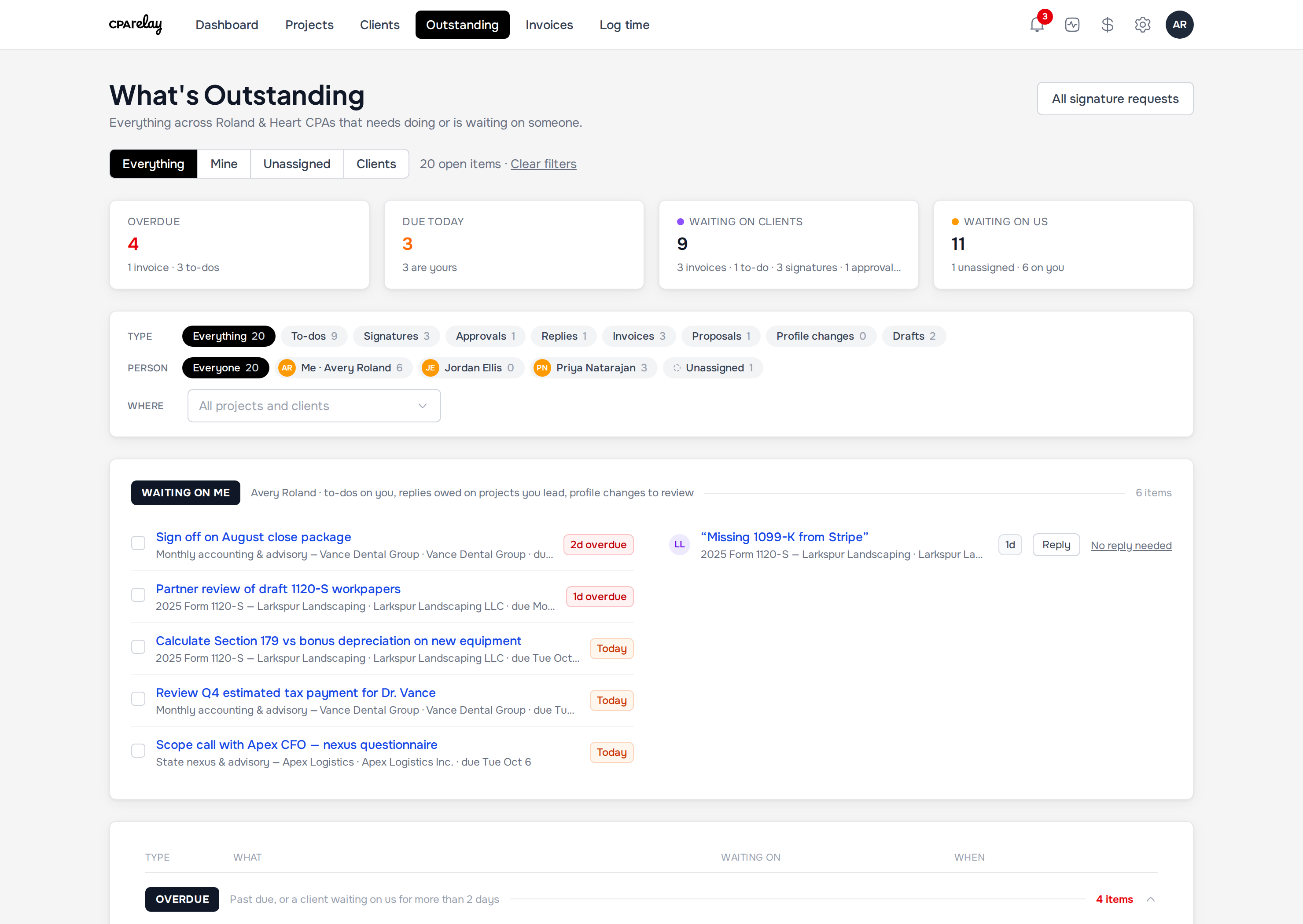
Stop opening thirty project tabs to find out what's stuck. What's Outstanding gathers every open to-do, unsigned 8879, pending approval, unanswered client message, profile change request, and unpaid invoice onto one live board.
- Tells you exactly whose move it is: yours to do, client to do, needs to sign, or you owe a reply.
- Sorted by urgency: Overdue, Due today, This week, Later, and No date.
- Filter by Everything, Mine, Unassigned, Clients, a specific teammate, or a single client.
- Send a one-click nudge or snooze items that are waiting on a third party.
Projects & visual safety
How does Amber and Sky folder privacy prevent accidental client leaks?
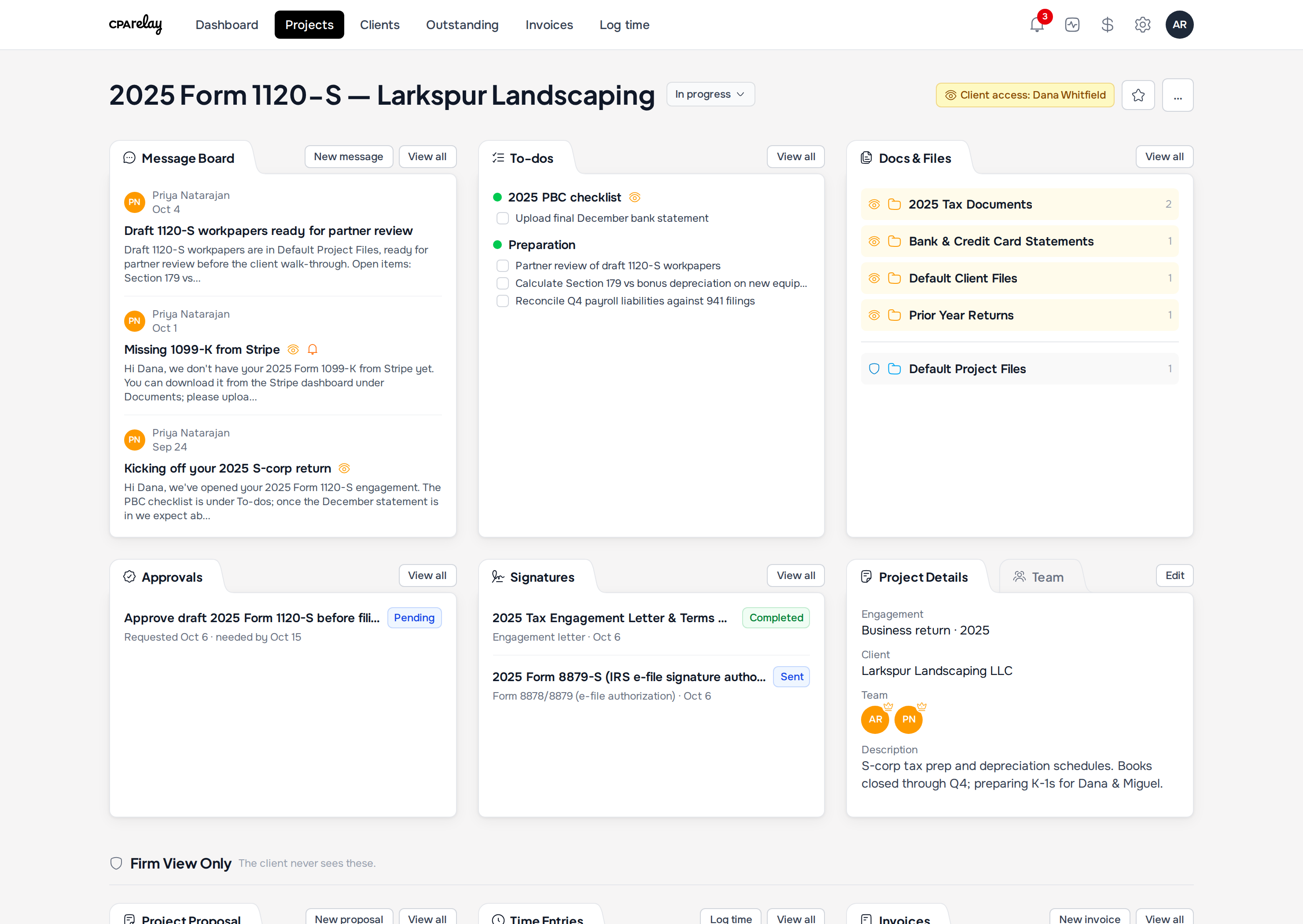
CPA Relay enforces visual, two-color privacy across every document, folder, and message thread in your firm. Amber items marked with an eye icon are visible to clients in their secure portal, while Sky-blue items marked with a shield icon remain strictly confidential to firm staff, completely preventing accidental client exposure of internal workpapers.
- Amber with an eye icon: Shared with the client in their portal.
- Sky blue with a shield icon: Strictly private to your firm's team.
- Six clear project stages: Move work from Intake and Waiting on client through In progress, In review, Waiting on signature, and Done.
- Firm View Only billing row: Proposals, time entries, and draft invoices live in a private zone clients can never open.
The client experience
A client portal that answers one question: "Is there anything I need to do?"
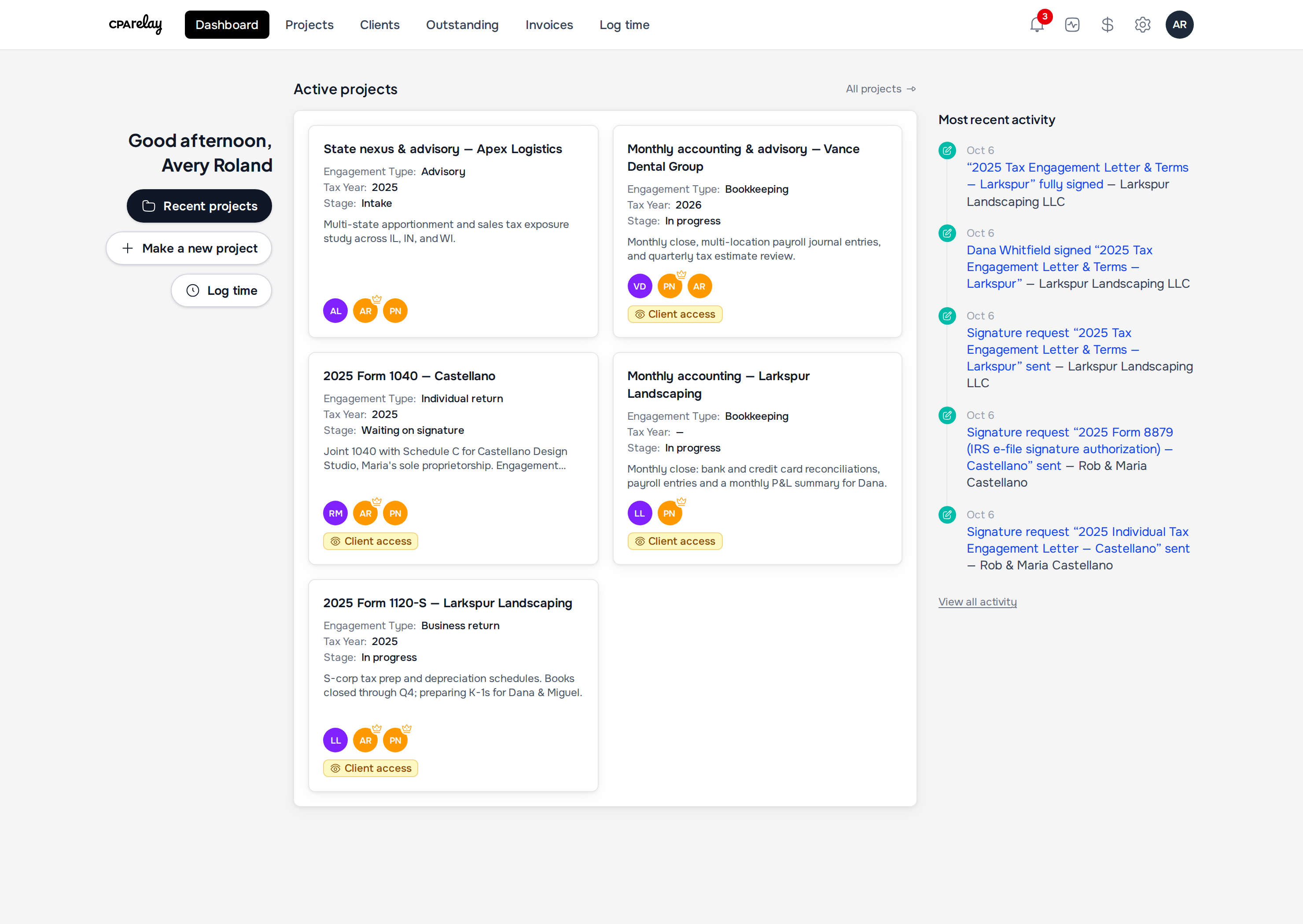
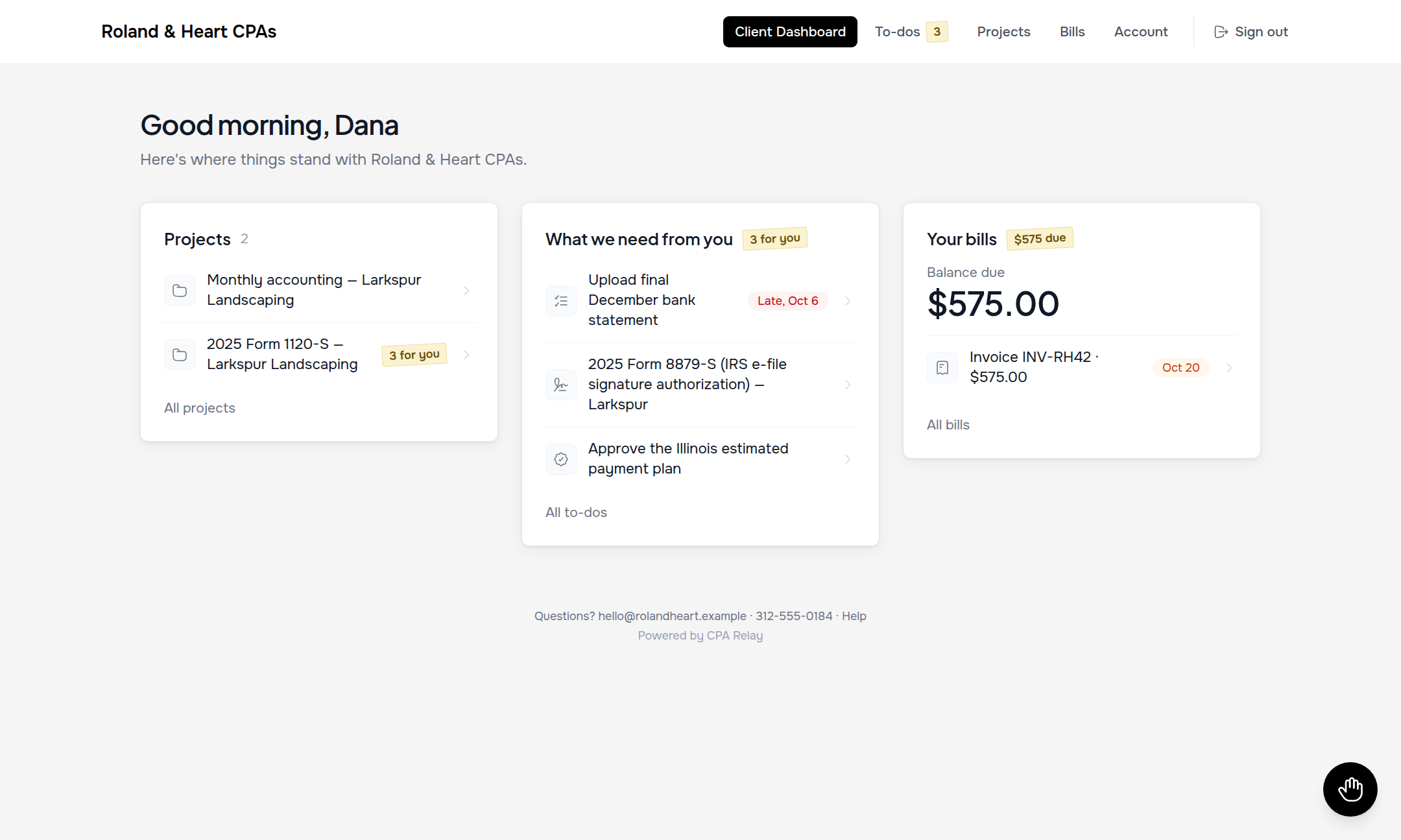
Clients abandon portals when they look like cockpit dashboards. When your client signs into CPA Relay, the Home screen answers one question: is there anything you need to do right now?
- Three quiet cards: Active projects, what the firm needs from you, and outstanding bills—all on one clean, unified screen.
- One login for multiple entities: A business owner can manage their family's 1040, their S-Corp, and their rental LLC from a single login.
- Papers to keep: Executed engagement letters and shared tax returns stay organized for 24/7 self-service download.
- No login required for quick actions: Clients can also sign documents, accept proposals, and pay invoices straight from secure email links.
Signatures & 53 starter templates
Can married spouses sign Form 8879 electronically using a single shared email address?
Yes. CPA Relay solves the common joint-return bottleneck by issuing two distinct, tokenized signing sessions to the same family email address. Each spouse passes independent identity verification and executes their own signature with full IRS Publication 1345 compliance, eliminating the need to create artificial secondary email accounts.
- 53 ready-made templates: Individual, business, and estate engagement letters, 7216 consents, payroll, bookkeeping, and records-release forms.
- Form 8878/8879 compliance guardrails: Requires you to record identity verification (in-person or third-party KBA) and refuses "no verification."
- Spouses on a shared email: Each signer gets their own tokenized signing link and email verification code—even when delivering to the same family inbox.
- Permanent SHA-256 audit trail: Every executed PDF binds the document, signature page, timestamps, IP addresses, and cryptographic fingerprint together.
Proposals, time & billing
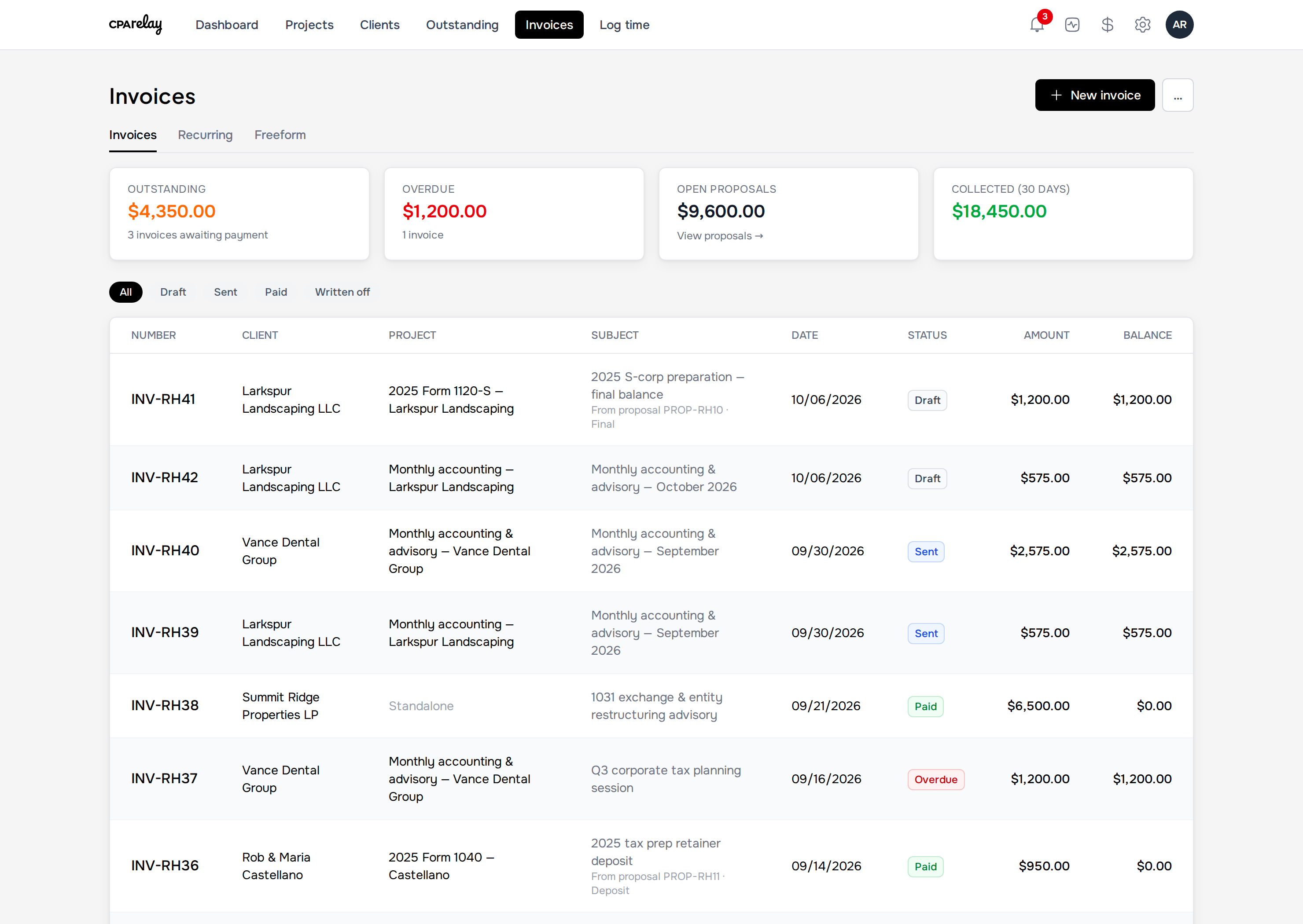
Turn hours and proposals into paid invoices without retyping a thing
Whether you bill fixed-fee proposals, hourly advisory rates, or monthly bookkeeping retainers, your billing lives right inside the engagement—and payments go straight to your firm's Stripe account.
- Locked-in historical rates: Raising your Partner or Staff rates in your Price Book never alters time you already logged.
- Automatic unbilled tracking: The moment unbilled hours are added to an invoice, they mark themselves billed—no manual checkboxes to flip.
- Staged proposal billing: Send a quote for online acceptance, then bill a deposit, progress draw, or final balance without double-taxing.
- Client Auto-Pay & Stripe payouts: Accept ACH, cards, and Cash App Pay, or let recurring bookkeeping clients turn on Auto-Pay.
Deliberate boundaries
What CPA Relay refuses to be
Software gets bloated when it tries to replace tools you already like. Here is where we draw the line.
Not a tax calculation engine
We don't calculate tax forms or transmit e-files to the IRS. Keep Drake, UltraTax, Lacerte, ProConnect, or Axcess. Use CPA Relay to collect the client's documents, get the 8879 signed, deliver the finished copy, and collect your fee.
Not a general ledger or payroll processor
We don't run client trial balances or cut employee paychecks. Keep QuickBooks Online, Xero, or Gusto for the books—use CPA Relay to manage the monthly close checklist and bill the retainer.
Not a cold-outreach sales CRM
We don't build marketing drip funnels, lead-scoring pipelines, or mass newsletter blasts. CPA Relay is a quiet operational workspace for the clients you actually serve.
Practitioner guides
Field notes on CPA workflow & compliance
Practical guides on IRS Form 8879 rules, PBC document checklists, and choosing software for a small firm.
IRS compliance
IRS Form 8879 KBA Requirements
The plain-English guide to IRS Pub 1345: identity verification rules, spousal signatures, and audit trails.
Read guideWorkflow & operations
The PBC Checklist Guide
How small CPA practices replace 35-page organizers with itemized requests clients complete on their phones.
Read guideSoftware evaluation
Best TaxDome Alternatives (2026)
An honest comparison of practice management options for small firms that want a short setup.
Read reviewFrequently asked questions
Common questions about CPA Relay
Clear answers to common questions from practitioners evaluating CPA Relay for their firm.
How does CPA Relay differ from enterprise suites like TaxDome or Canopy?
CPA Relay eliminates weeks of administrative configuration by focusing strictly on the core engagement loop for 1–15 person accounting practices. Instead of complex pipeline builders and mandatory annual contracts, CPA Relay delivers ready-to-use client portals, 53 starter engagement letter templates, Form 8879 e-signatures, and Stripe billing at $55 per seat with zero setup friction.
Can married spouses sign Form 8879 electronically using a single shared email address?
Yes. CPA Relay solves the common joint-return bottleneck by issuing two distinct, tokenized signing sessions to the same family email address. Each spouse passes independent identity verification and executes their own signature with full IRS Publication 1345 compliance, eliminating the need to create artificial secondary email accounts.
How does Amber and Sky folder privacy prevent accidental client data leaks?
CPA Relay enforces visual, two-color privacy across every document and message. Amber items marked with an eye icon are shared with clients in their secure portal, while Sky-blue items marked with a shield icon remain strictly confidential to firm staff, completely preventing accidental client exposure of internal workpapers.
Give your firm a workspace that feels like relief
We set up every firm personally with its own custom web address. One plan, $55 per seat. Tell us a little about your practice and we'll get your invitation ready.
Month-to-month when billing begins · Unlimited free client logins