Projects & workflow
Accounting workflow & engagement management software
Generic task boards force you to bend software cards into tax engagements. In CPA Relay, a project is an actual engagement—complete with a tax year, engagement type, 6 clear status stages, assigned project leads, and strict visual separation between client-shared and firm-only work.
Built for 1040s, Business returns, Bookkeeping, Advisory, Payroll & Estate work
Six clear stages
How do the 6 accounting-specific engagement stages replace conditional pipelines?
Unlike generic project tools requiring dozens of conditional automations, CPA Relay tracks tax and CAS jobs across six purpose-built stages: Intake, Waiting on client, In progress, In review, Waiting on signature, and Done. This gives practitioners instant operational clarity on who has the ball without workflow engineering overhead.
You don't need 40 hours of conditional pipeline engineering to know who has the ball. Every project moves freely across six plain-English stages—and you can filter your firm's Projects list by tax year, engagement type, lead, or client as you type.
- Six stages that match real accounting: Intake, Waiting on client, In progress, In review, Waiting on signature, and Done.
- Project Leads & Team scoping: Crowned project leads manage client access and billing; staff can be scoped to see only the projects they work on or every project in the firm.
- Personal bottom bar everywhere: Every staff member has one-click access to My Tasks, My Bookmarks, My Activity, My Notes, and My Time along the bottom of every screen.
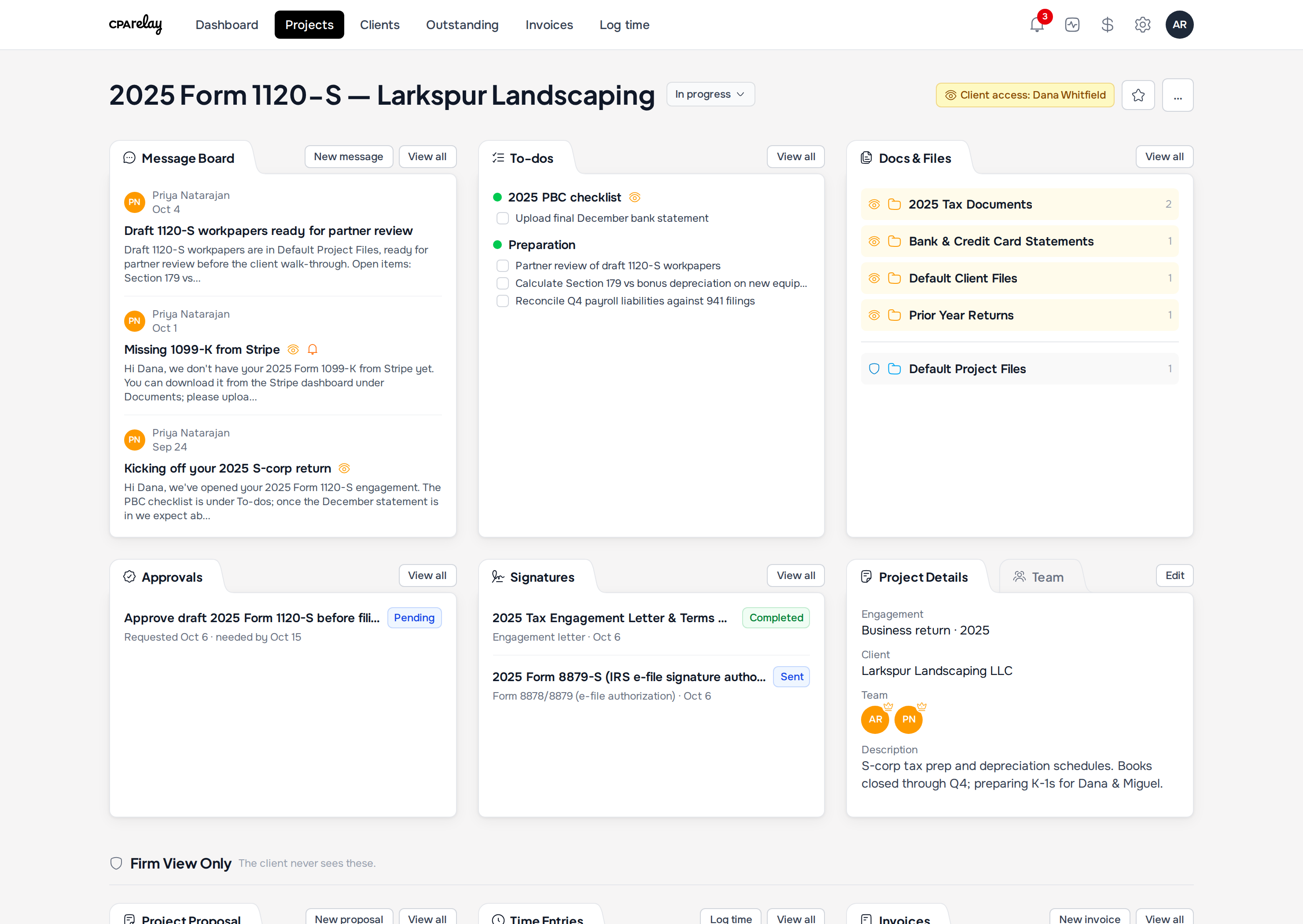
Amber vs. Sky visibility
How does visual role separation keep firm workpapers private inside client projects?
Inside every CPA Relay project, client collaboration and internal accounting work live together under strict badge boundaries. Amber badges with eye icons denote client-facing messages and document requests. Sky Blue badges with shield icons designate private partner review notes, preparation checklists, staff time entries, and draft workpapers.
Inside a project, your team and your client work in the same place without ever crossing wires. Amber badges with an eye icon mean the client can see it; Sky blue badges with a shield mean it is locked to your firm.
- Message Board: Post internal team threads (private by default) or share announcements with the client. Unanswered client posts light up an orange Awaiting your reply bell.
- To-dos: Create shared client PBC checklists alongside private internal prep and partner review lists.
- Docs & Files: Keep shared client upload folders (amber) right above your internal working paper folders (sky blue).
- Firm View Only row: Project proposals, time entries, write-downs, and draft invoices sit in a dedicated firm-only zone at the bottom of the project.
One-click annual roll-forward
How does one-click annual tax roll-forward prepare next year's engagements?
Clicking Roll Forward automatically increments the tax year in the project title and metadata, reopens standard PBC checklists, and preserves client relationships and staff leads. Last year's executed 8879s, final returns, workpapers, and paid invoices stay permanently archived in the prior-year project without cluttering the new season.
When January hits, don't rebuild your client projects by hand. Click Roll forward on last year's project and CPA Relay creates the new tax year's engagement automatically.
- Automatically increments the tax year in both the project title and the Tax Year field (e.g., 2025 Form 1040 becomes 2026 Form 1040).
- Carries over the client, project team, leads, folders, and to-do lists (re-opening tasks for the new year).
- Leaves last year's uploaded PDFs, signatures, and invoices safely archived in the prior-year project.
Lifecycle & automation rules
The 6 CPA Relay engagement stages & roll-forward rules
A standardized engagement lifecycle built directly for small CPA firms. Track exactly where each tax return, CAS engagement, or advisory project stands from onboarding to annual roll-forward:
| Stage Name & Number | What Triggers This Stage | Who Has The Ball | Roll-Forward Next Tax Year Rule |
|---|---|---|---|
| 1. Intake | Engagement letter signed, tax year initialized, or project rolled forward from prior year | Firm (assigning lead preparer, verifying contacts, applying PBC template) | Created as the initial default stage for newly rolled-forward tax year engagements |
| 2. Waiting on Client | PBC document checklist or information requests published to client portal | Client (uploading W-2s, 1099s, bank statements, or answering questions) | Re-opens carried-over PBC to-do lists with fresh offsets relative to new filing season |
| 3. In Progress | Client submits required source documents and checks off intake items | Firm staff (preparing return, logging billable time, drafting workpapers) | N/A — active preparation stage specific to current filing year |
| 4. In Review | Preparer completes draft return and assigns partner review to-do | Reviewing partner / manager (performing diagnostic checks and clearing review notes) | Prior-year tick-marks and partner notes remain permanently archived in prior project |
| 5. Waiting on Signature | Draft return approved; Form 8878/8879 or client sign-off request issued | Taxpayer & spouse (completing KBA or OTP verification and signing authorization) | Fully executed Form 8879 PDF and SHA-256 certificate lock into prior-year client vault |
| 6. Done | IRS e-file accepted, final client copy published to portal, invoice settled | Complete — ready for off-season maintenance or annual roll-forward | Serves as the foundation project that feeds the one-click Roll Forward button |
Frequently asked questions
Engagement management questions & answers
Can staff members be restricted to see only their assigned projects?
Yes. CPA Relay supports project lead scoping. Firm administrators can grant staff access to all firm engagements or restrict team members to only the specific projects where they are assigned as lead or team contributor.
How does CPA Relay alert partners when a client replies to a message?
When a client responds to a request or posts a question on the project Message Board, an orange "Awaiting your reply" badge illuminates on the firm's What's Outstanding triage board and project header until answered.
Does rolling forward an engagement delete or overwrite prior-year documents?
Never. Roll-forward creates a brand-new, isolated project for the upcoming tax year (e.g., 2026 Form 1040). All uploaded client PDFs, internal workpapers, signed 8879 authorizations, and invoice records remain securely preserved in the prior-year project.
Related guides & comparisons
Workflow strategies for growing firms
Practitioner Guide
Practice Management for Small CPA Firms
Why most enterprise suites overwhelm small firms and how to structure calm tax-year workflows.
Read evaluation guideComparison
Spreadsheets & Email
Why tracking client tax files in shared workbooks breaks down and how a single triage view fixes it.
Compare workflowsComparison
CPA Relay vs. TaxDome
Why small firms choose focused project management over complex 40-hour enterprise setups.
Compare suitesRun every engagement from one organized page
Request an invitation for your practice and we'll set up your firm's dedicated web address.
$55 per seat, everything included · Unlimited free client logins