
Time Tracking & Price Book
Accountant time tracking & Price Book software
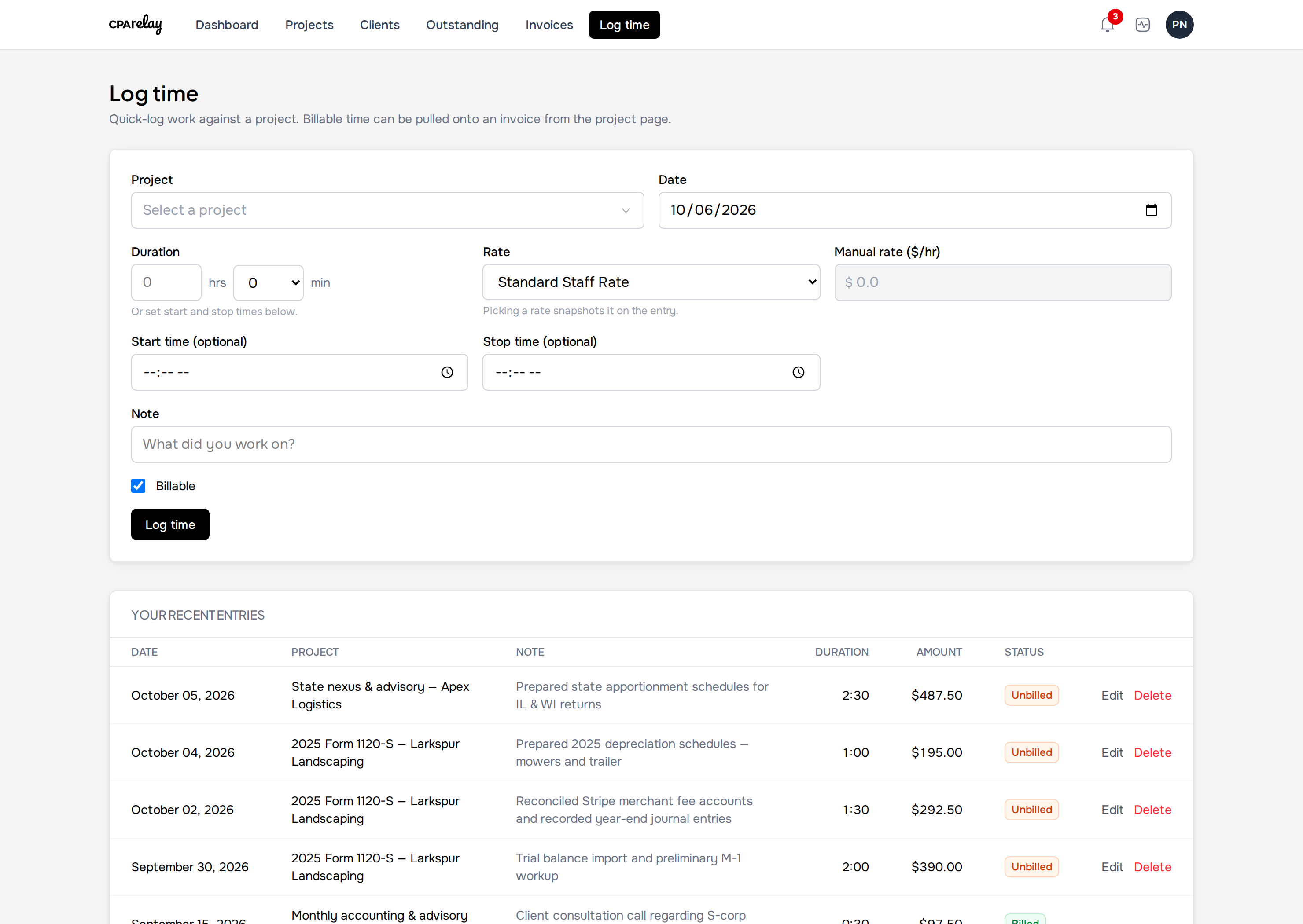
Whether a client calls with a 15-minute S-Corp question or your staff spends three hours reconciling payroll, logging time takes seconds from the Dashboard or inside the project.
Supports 6-minute (0.1 hr) and 15-minute (0.25 hr) billing increments
Price Book & rounding
How does historical Price Book rate locking prevent corrupted billing data?
When staff log time in CPA Relay, the hourly rate from Settings → Price Book copies permanently onto the time entry. When your firm raises billing rates next tax season, historical unbilled and billed hours retain their original agreed labor value, preventing unexpected recalculations or corrupted project realization.
Set up your firm's reusable hourly rates (like Partner Rate, Senior Rate, or Bookkeeping Rate) in Settings → Price Book. The moment someone logs an entry, that rate is copied onto the entry—so changing a rate later in your Price Book never rewrites time you already logged.
- Tenths (6 min) or Quarter hours (15 min): Choose your firm's billing increment in Settings. A 20-minute call logs as
0:20and bills automatically as0.4 hr(tenths) or0.5 hr(quarters). - Billable & non-billable tracking: Untick Billable to record internal prep time at no charge without losing visibility into hours spent.
- Log from the Dashboard or the Project: Use the Log time pill on your home Dashboard between calls, or log directly on a project's Time Entries tab.
Audit-clean billing
How does automatic unbilled time rollup eliminate double-billing and missed revenue?
CPA Relay derives billed status automatically from invoice references rather than manual checkboxes. One-click "New invoice from time" pulls all unbilled project hours into a draft invoice. Once attached, time entries freeze permanently, preventing staff from altering historical hours or billing the same work twice.
In spreadsheet trackers and basic timers, staff forget to mark hours as billed—leading to awkward double-billing or forgotten revenue. In CPA Relay, adding unbilled time to an invoice marks it billed automatically and freezes the entry so nobody can accidentally alter historical work.
- One-click "Unbilled time" invoicing: Pull all open billable entries on a project onto a new draft invoice at once.
- Billed time is frozen: Once an entry is on an invoice, its hours, rate, date, and project are locked unless removed from the draft invoice first.
- My Time personal sheet: Every team member can open My Time from the bottom bar to review and edit their own unbilled entries across the firm.
Price Book economics
How do 6-minute tenths and 15-minute quarters simplify accountant time tracking?
Practitioners choose between standard 6-minute (0.1 hr) or 15-minute (0.25 hr) increments in firm settings. A quick 20-minute client call logs as 0:20 and automatically converts to 0.4 or 0.5 billable hours. All time entries remain strictly firm-only, completely hidden from client portal views.
| Price Book Role / Tier | Base Hourly Rate | Billing Increment & Rounding Math | Historical Locking Rule | Invoice Conversion & Write-Down Behavior |
|---|---|---|---|---|
| Partner / Principal Rate | $300.00 – $450.00/hr | Tenths (6 min) or Quarters (15 min); e.g., 20 mins rolls to 0.4 hr ($120.00) | Rate copies to entry at submission; editing Price Book next year never recalculates logged work | 1-click pull into draft invoice; supports private partner courtesy discounts with reason notes |
| Senior Accountant / Manager | $180.00 – $275.00/hr | Tenths (6 min) or Quarters (15 min); e.g., 45 mins rolls to 0.75 hr ($135.00) | Locked permanently once attached to draft or final invoice; cannot be deleted or re-billed | Full hours rollup to invoice line; firm tracks gross realization vs. net collected fees |
| Staff Accountant / Preparer | $120.00 – $175.00/hr | Tenths (6 min) or Quarters (15 min); e.g., 1 hr 10 mins rolls to 1.2 hr ($144.00) | Captured at log time; staff can edit in My Time bottom bar until billed | Bundles prep hours into milestone service lines without exposing individual staff hourly rates |
| Bookkeeper / CAS Specialist | $75.00 – $120.00/hr | Tenths (6 min) or Quarters (15 min); e.g., 30 mins rolls to 0.5 hr ($45.00) | Preserved across recurring monthly accounting cycles and project roll-forwards | Converts to recurring retainer invoices or unbilled project draw with 1 click |
Frequently asked questions
Time tracking & Price Book questions
Can team members edit their time entries after submitting them?
Yes, staff can review and adjust their unbilled entries from their personal My Time sheet on the bottom bar. However, once an entry is attached to an invoice, it freezes permanently to maintain complete billing integrity.
Are staff hourly billing rates or timers ever visible to clients?
Never. Time tracking in CPA Relay is strictly internal. Clients only see the finalized invoice lines you choose to publish, while staff rates, raw hours, and private write-downs remain locked in the firm view.
Can we track non-billable administrative or prep time?
Yes. Simply uncheck the "Billable" toggle when logging an entry. CPA Relay tracks staff time spent on non-billable administrative work or initial client consultations without adding charges to client invoices.
Related features & comparisons
Practice economics and time tracking
Companion feature
Invoicing & Stripe Payments
Convert unbilled hours into branded invoices with private firm write-downs and auto-pay.
Explore billingComparison
CPA Relay vs. Karbon
Why small CPA practices choose focused time entry over complex, notification-heavy email suites.
Compare workflowsPractitioner Guide
Practice Management for Small CPA Firms
How small CPA firms capture billable advisory time and convert hours to invoices without administrative drag.
Read evaluation guideStop losing billable advisory calls to memory
Request an invitation for your firm to see how CPA Relay connects your Price Book, time logs, and invoices.
Time entries are strictly firm-only · Clients only see the final invoice